Sarathi Parivahan App: NextGen mParivahan, Download & Fakes
A WhatsApp message says you have an unpaid traffic challan. To see it, it asks you to install “MParivahan.apk”. Files like this keep circulating across states, and the real app never reaches you this way.
Sarathi itself is a website, sarathi.parivahan.gov.in. The government app that carries your Sarathi driving licence is NextGen mParivahan, built by the National Informatics Centre (NIC) for MoRTH. This page shows how to find the real listing, what the app does well, and what you still have to do on the website.
Is there a separate Sarathi Parivahan app?
Sarathi runs as a website, and the government app you need on your phone is NextGen mParivahan. It reads your licence from the Sarathi database and your vehicle record from Vahan, so the details match what the RTO holds. Searching for “Sarathi Parivahan app” should lead you to this one listing.
That difference matters when you look for a download. Apps called “Sarathi Parivahan”, “RTO Sarathi” or similar from other developers are private apps, not the government’s. Some are harmless information apps; none can issue or change a licence.
Check the listing before you tap Install
The genuine app is free and comes only from the Google Play Store or the Apple App Store. Before installing, open the listing and match three details: the app name, the developer and the price. If any one is different, it isn’t the government app.
- App name: NextGen mParivahan
- Developer on Google Play: NIC eGov Mobile Apps (package com.nic.mparivahan in the store link)
- Developer on the App Store: NIC, with the provider shown as National Informatics Centre
- Price: free, with no in-app payment to “unlock” a licence
- iPhone: needs iOS 14.0 or later
The Kerala Transport Commissioner has said in public that mParivahan doesn’t use APK files and is offered only through the official app stores. Treat any APK file or download page outside the stores as fake, whatever its logo.
What the app can do, and what still needs the website
NextGen mParivahan is a document and lookup app. It holds a virtual copy of your driving licence and RC, and lets you check licence and vehicle details. Applying for a licence, taking the LL test or booking a driving test still happens on sarathi.parivahan.gov.in.
| In NextGen mParivahan | On sarathi.parivahan.gov.in |
|---|---|
| Virtual DL and RC with an encrypted QR code | Applying for a learner’s or driving licence |
| DL and RC search, and DL details check | The Road Safety tutorial and online LL test |
| Vehicle lookup: owner name, registration date, insurance and fitness validity | Booking LL and DL test slots in Appointments |
| Road offence and road accident reporting | Uploading documents and paying licence fees |
| RTO and traffic office locations | Renewal, duplicate DL, change of address |
| Vehicle validity check by mobile number (added in the latest iOS update) | Tracking an application with Application Status |
The App Store description itself says complete transport office services are still to come. Read that as an honest limit: the app shows and verifies documents, while the licence work stays on the portal.
The virtual DL in the app is legally valid. MoRTH’s 2018 advisory told states to accept DigiLocker and mParivahan documents as equal to the originals, under the IT Act 2000. Once your licence is issued, you can add your driving licence to the app and show the QR code at a checkpoint. Your RC works the same way; see how to get your RC copy.
Myths that cost people money
Most losses tied to the “Sarathi app” come from a few beliefs that sound reasonable. Each one below is wrong, and the correction comes from transport departments, the PIB Fact Check unit or the app’s own listing.
Myth: Challans come on WhatsApp with an app to view them. Fact: Kerala’s Motor Vehicles Department says the police and MVD don’t send challan details on WhatsApp. Real e-challan alerts come as SMS to the mobile number on your RC.
Myth: An APK is just the same app, downloaded faster. Fact: Fake files named “RTO E Challan.apk” or “MParivahan.apk” carry malware that can read your SMS, catch OTPs and empty bank accounts. The real app is never sent as a file.
Myth: A download page that asks you to “allow unknown sources” is fine if it shows the government logo. Fact: The store version never needs that setting. Any page asking you to switch it on is giving you an app from outside the store.
Myth: The app asks for contacts and messages because it needs them for the challan. Fact: A request for access to your contacts, messages and calls is one of the red flags fact-checkers list for the fake app.
PIB Fact Check’s advice is simple: check a pending challan only on the official Parivahan e-Challan site, and install apps only from the official stores. Our sarathi parivahan portal page lists the government websites to bookmark.
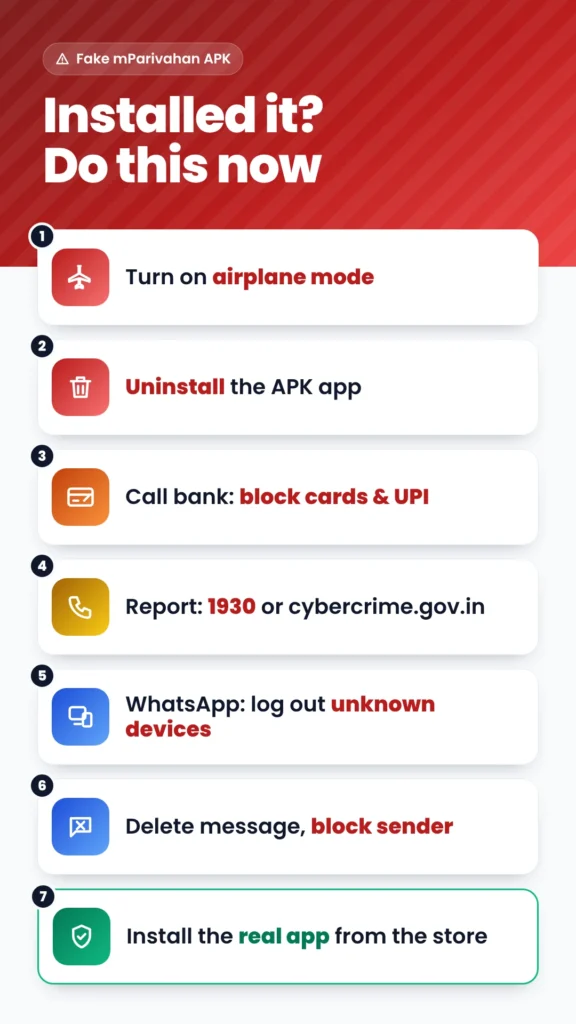
Installed an APK already? Do this now
Act before the malware forwards itself to your contacts. Disconnect, remove the app, then protect your bank and WhatsApp. These steps follow the advice given by cyber-safety reporting on the e-challan APK campaigns.
- Turn on airplane mode, so the app can’t send your SMS or OTPs.
- Open Settings → Apps and uninstall the app you installed from the file.
- Call your bank’s helpline and block your cards and UPI if you entered any detail or saw an unknown transaction.
- Report the fraud on the national cybercrime helpline 1930 or at cybercrime.gov.in.
- In WhatsApp, check Linked devices and log out any device you don’t recognise.
- Delete the original message and block the sender. Don’t forward it, even as a warning.
- Install NextGen mParivahan from the Play Store or App Store, and check your challans there or on the e-Challan site.